In this article
Running a creator business can involve far more than creating content or delivering a service.
You answer inquiries, negotiate appointment times, confirm bookings, send payment instructions, follow up on unpaid invoices, and remind people when their sessions are scheduled.
These tasks may seem small individually. Over time, however, they can take attention away from the work that actually generates income.
If you're constantly chasing people for details, it may be time to improve your booking workflow.
The hidden cost of manual scheduling
Imagine receiving ten appointment inquiries in one afternoon.
Each person wants to know your availability. Some ask about prices. Others request a different time, forget to confirm, or need payment instructions. You then have to keep track of who booked, who paid, and who still needs a reminder.
Now imagine managing that process across several social media platforms.
The problem isn't that you have customers. The problem is that too many steps depend on you remembering to do everything manually.
At a glance
Replace back-and-forth DMs with one booking link.
Make payment expectations clear before people commit.
Let reminders do the chasing for you.
1. Give customers a clear booking process
Instead of negotiating every appointment through direct messages, provide a dedicated booking link.
A structured booking experience should make it easy for customers to understand the service, review the relevant details, and select an available appointment.
This reduces repetitive conversations and allows interested customers to take the next step when it's convenient for them.
2. Make payment expectations clear
Uncertainty around payment can create unnecessary follow-up.
Explain whether payment is required when booking, what the price includes, and what happens if a customer needs to cancel or reschedule.
Where supported, connecting payments to the booking workflow can reduce the need to send payment instructions separately.
Keep your terms visible so customers know what to expect before committing.
FanHubb sends booking reminders 24 hours and 1 hour before each session.
3. Use reminders to reduce missed appointments
A scheduled appointment can easily be forgotten, especially when customers have busy schedules.
Automated or scheduled reminders can help customers remember the date and time of their appointments.
Reminders can also give customers an opportunity to review their booking information before the session. They won't eliminate every missed appointment, but they reduce the need for you to send each reminder manually.
Each booking’s joining link opens through FanHubb, so you can see when it was opened.
Link activity on a FanHubb booking. Example.
4. Track activity and learn what works
If you're sharing booking links across multiple channels, tracking can help you understand which links receive clicks.
For example, you might discover that a link shared in your creator profile receives more attention than one posted in a story.
Use this information to make better decisions about where to promote your services. Remember that link clicks are not the same as confirmed bookings or completed payments, so evaluate those outcomes separately when the data is available.
5. Keep your business tools connected
The more disconnected tools you use, the more information you may have to move between them.
Look for ways to bring important workflows together: booking, payments, reminders, fan communication, and records of your earnings.
You don't need to automate every task immediately. Start with the activity that creates the most friction in your daily routine.
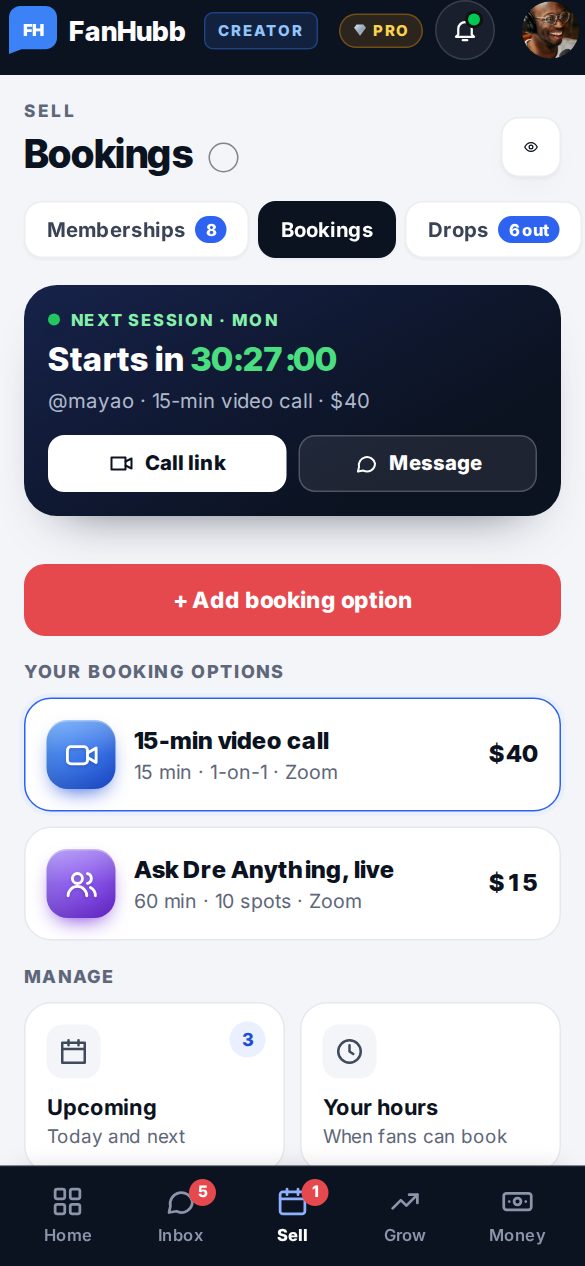
Bookings, payments and reminders in one place
Fans pick a time, pay, and get your link straight away. 48 hours after the session, it’s released, then added to your available balance on the date shown in Payouts.
Start freePayments processed by Stripe
Simplify your creator business with FanHubb
FanHubb offers creators tools for monetization and booking, including scheduling, payments, reminders, and booking-link tracking.
You can use these alongside fan memberships, paid messages, tips, premium posts, and other features designed to support your creator business.
The goal is straightforward: spend less time coordinating routine business tasks and more time delivering the work people value.
Your time is valuable. Your booking process should respect it. Explore FanHubb to see how its creator and booking tools can fit into your workflow.